

Recurring payroll adjustments show that an organization is catching issues with data, decisions, or information flow too late. Their cost goes beyond just recalculation. It also includes the time spent by HR, payroll, managers, and IT to determine where the discrepancy originated and who is responsible for resolving it. Therefore, what matters is not just the number of adjustments, but also the time taken to reach their source, the number of teams involved, and the recurrence of the same root causes. Organizing data, deadlines, responsibilities, and controls before processing helps increase process predictability and reduces manual reconciliations under the pressure of month-end closing.
The payroll is almost ready. Then, an absence approved after the deadline appears, a change in FTE effective from the beginning of the month, or a compensation component that wasn't in the data before. In payroll, you only see the result: a different amount, an alert, or the need for a recalculation. To determine the cause, you have to trace back to where the change originated, was approved, or was passed along.
The adjustment itself doesn't say what went wrong, but it shows the moment when a previous change became financially visible.
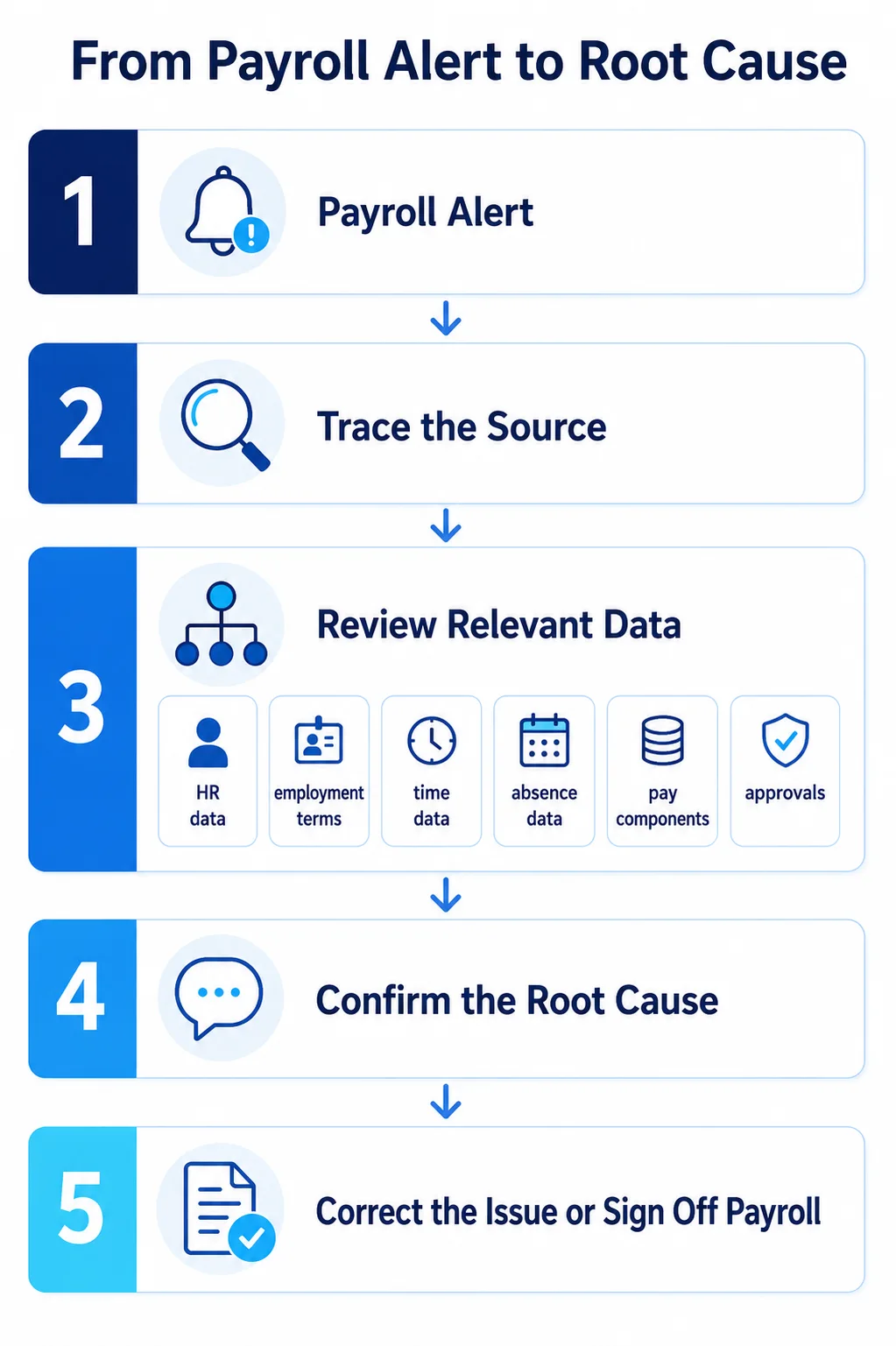
A correction is often the final step. First, you need to determine where the discrepancy came from, which data it concerns, and whether it is an isolated case or a sign of a process issue.
Process quality is not defined solely by the number of adjustments. The time required to move from an alert to identifying the root cause is also significant.
Where do adjustments come from
An FTE change might be effective from the first day of the month but entered after the cutoff date. A bonus might be approved but assigned to the wrong period. An absence might be correctly registered but only approved after the initial calculation. Overtime might still be waiting for a manager's decision.
Then there are integrations. A message can be sent and received without a technical error. That doesn't necessarily mean the change was assigned to the correct employee, compensation component, and payroll period.
Technically correct does not always mean business-ready for processing.
That is why resolving an adjustment should not start solely with the amount. First, you must reconstruct the path of the change:
- where the data originated,
- when it became effective,
- who entered and approved it,
- when it reached payroll,
- whether it passed the proper validations,
- whether it was used in the correct payroll period.
If employee data is scattered, every adjustment requires checking multiple places. Under the pressure of month-end closing, both the time required for resolution and the risk of missing important information increase.
I describe the consequences of using different versions of the same data in more detail in this article: Zero data risk: How does a "single source of truth" protect against management paralysis?
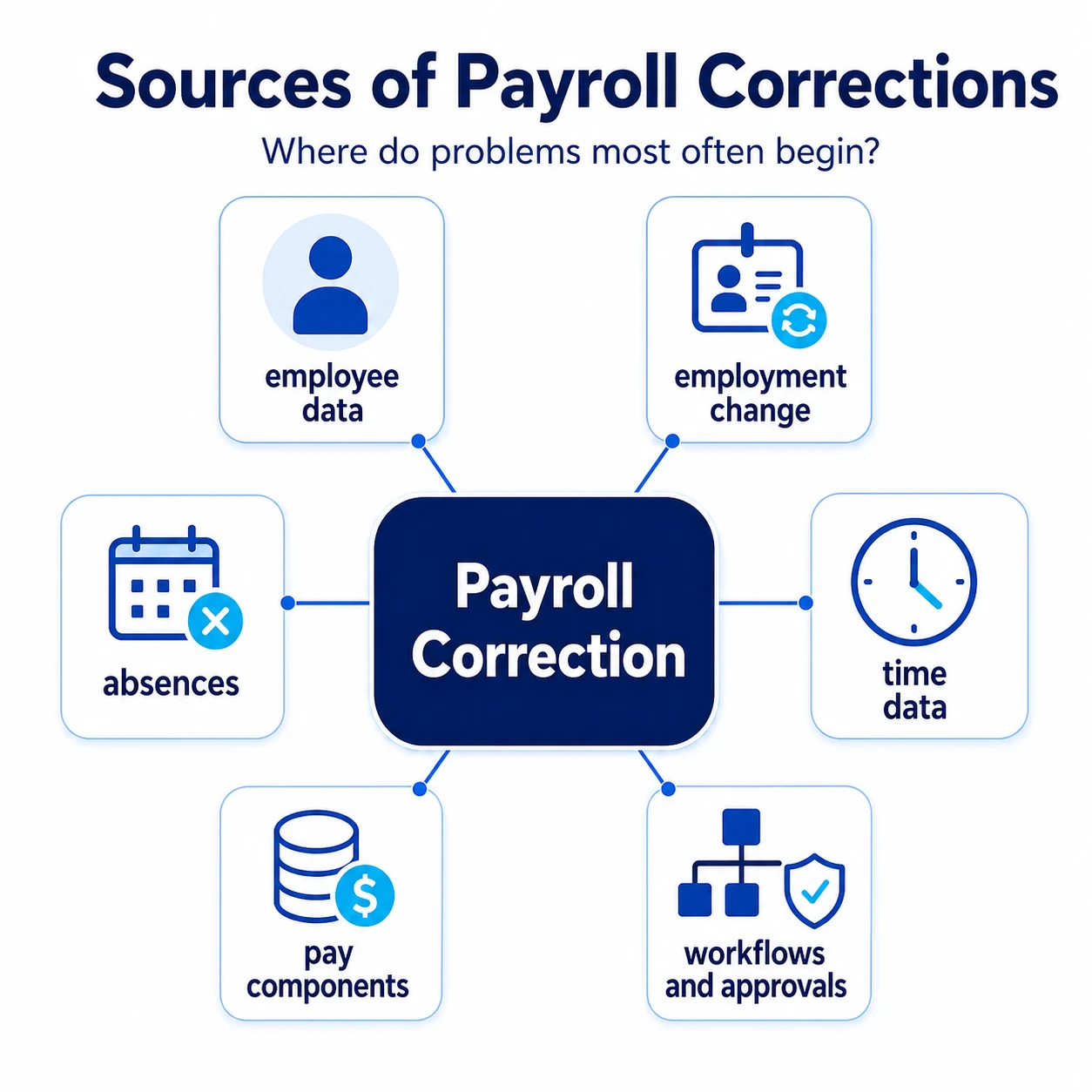
A fix closes the case, the source reveals the process
A single late approval might be an exception. If a similar situation recurs the following month, with a different employee and a different amount, it says something about how the process works.
If corrections frequently involve absences, it is worth checking when they are recorded and approved. If they recur during changes in employment status, you need to review the effective dates, data entry deadlines, and the timing of the handover to payroll. If the source is compensation components, the way they are created, approved, and checked for duplicates is what matters.
The same applies to integration. Recurring problems do not always stem from interface failures. The cause may be an ambiguous data source, incomplete mapping, a change made after the deadline, or a lack of business control on the target system side.
Removing an alert closes the case. Only classifying the root cause allows you to improve the process.
Two ways of handling corrections
The first team works with distributed sources. Employee data is in the HR system, working time is in another tool, some approvals happen via email, and payroll operates separately.
When a discrepancy arises, the specialist checks the file, change history, spreadsheets, messages, and integration status. Sometimes they also have to determine who made the decision and whether it applied to the current period.
The second team also receives an alert. However, they can see that it concerns an absence approved after the cutoff date or a salary change that did not go through the full approval path. They have access to the effective date, change history, process status, and the data sent for calculation.
The difference lies in how quickly you can identify the source of the problem and point to the owner of the stage where it originated.
The most burdensome corrections are those that span several areas. A change in employment status can simultaneously affect salary, work schedules, and cost allocation. An absence can change the calculation base, but explaining it still requires checking approvals and the date it was sent to payroll.
In such cases, it is not enough to point to one system as the source of the error. You need an owner for the entire path. HR is responsible for the accuracy of employment data, the manager for timely decisions, payroll for calculation rules, and IT for data flow and monitoring.
Boundaries of responsibility should be clear even when the process runs without errors. Otherwise, they only become apparent at month-end closing.
The same cost of manual coordination appears in other HR processes. I describe this mechanism in more detail in the article: Less administration, more strategy. How to intelligently automate repetitive HR processes?
Where technology can shorten the path to the source
Technology makes sense when you know which data is leading, who is responsible for changes, and when those changes should reach payroll.
SAP SuccessFactors Employee Central can support the maintenance of employment and compensation data, including effective dates for changes. SAP SuccessFactors Employee Central Time Management covers working time, absences, and related requests, while SAP SuccessFactors Time Tracking extends time recording capabilities.
At the end of this path lies pre-payroll validation. The Payroll Control Center allows you to manage payroll activities, monitor their progress, and handle alerts triggered by validation rules. Alerts can be routed to the teams responsible for resolving them before the final payroll run.
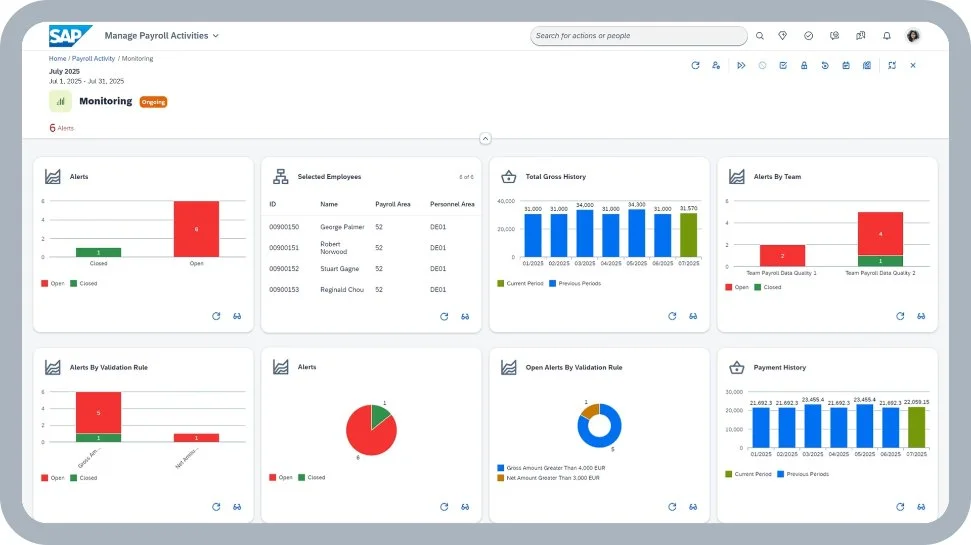
In a well-designed environment, an alert can pinpoint the area requiring review and shorten the path to the root cause: employee data, a change in FTE, an absence, a compensation component, or a pending approval.
However, simply launching individual solutions is not enough. You must also determine:
- which data originates in Employee Central and which in the payroll system,
- how retroactive changes are handled,
- what cut-off dates apply to individual teams,
- who responds to an alert and makes the business decision,
- how integration messages and errors are monitored.
The system can flag an exception and shorten the path to the source data. However, it cannot replace the process owner or the decision on whether a given change should be included in the current payroll run.
Pre-payroll validation
The most time can be recovered not by fixing payroll faster, but by detecting changes that require attention earlier.
Before the final payroll run, it is worth regularly checking the data, decisions, and exceptions that have the greatest impact on compensation.
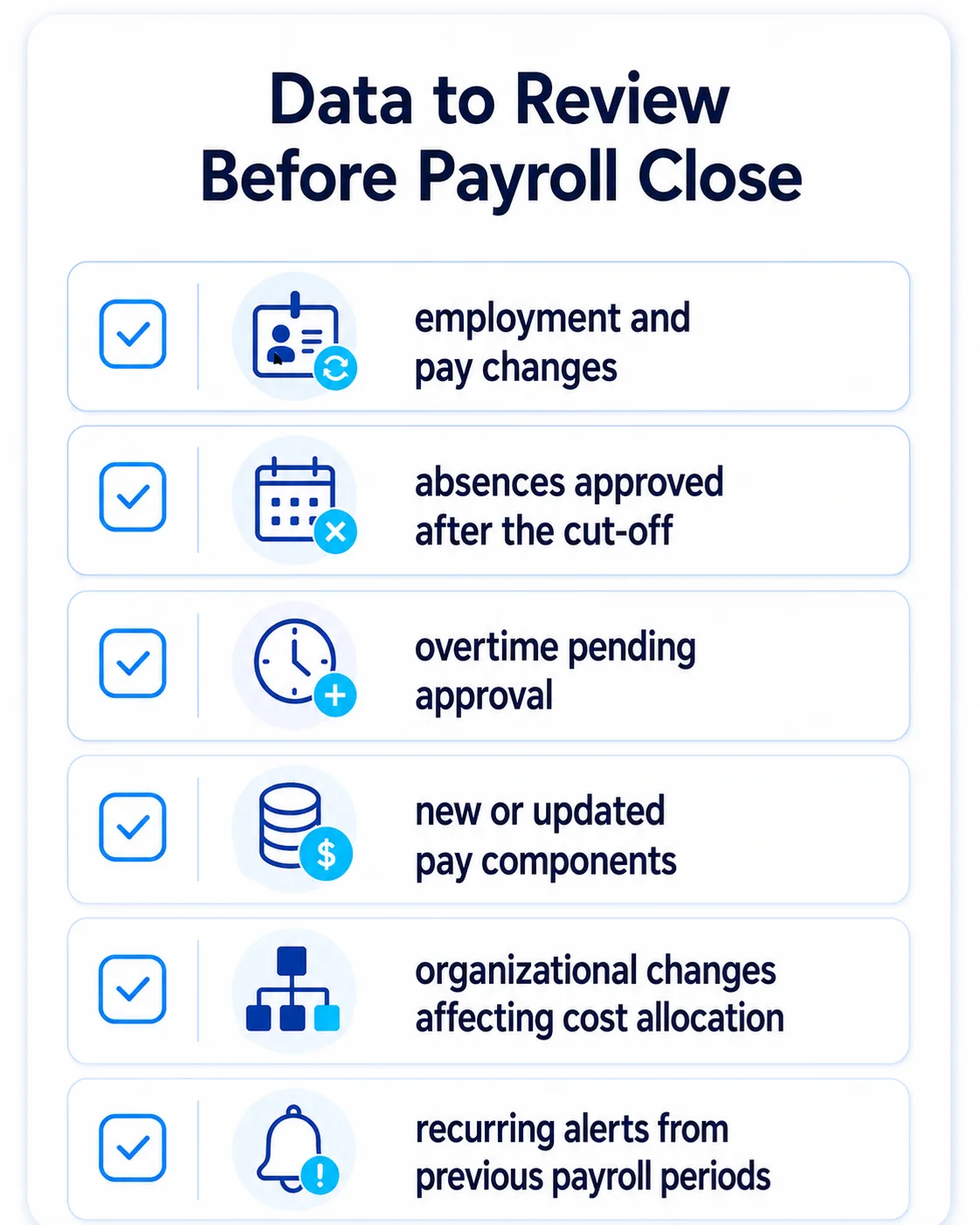
Such a review shifts work from the end of the process to a point where the source of a change can still be clarified without halting the entire closing process.
Therefore, the measure of process quality is not just the number of corrections. It is also worth checking how long it takes to reach their root cause, how many teams are involved in the resolution, and how often the same type of problem recurs.
From correction to process diagnosis
A good starting point is to review the last three payroll cycles.
It is worth categorizing adjustments into several groups: employee data, working time, absences, compensation components, approvals, integrations, or validations. Then, identify when the issue occurred, who is responsible for it, and how much time was needed to resolve it.
This overview will reveal where the process is actually stalling. Sometimes it will be fragmented data, other times a delayed decision, or perhaps a functional interface that is transmitting data that isn't business-ready.
Payroll adjustments are one of the most practical indicators of the quality of an HCM environment. They show whether an organization has organized data, clear accountability, robust integrations, and effective controls.
If the review of adjustments points to problems in several areas, it is worth taking a broader look at the foundations of the entire HR environment.
HCM AI Readiness Scorecard helps you check which areas are already in order and where you first need to improve data, processes, or controls.

Ludwik Bogdański is a certified expert with more than 15 years of experience in running and implementing SAP systems integration projects, covering both client implementations and cloud projects, including SAP SuccessFactors and SAP Business Technology Platform (BTP). He specializes in the migration and transformation of SAP systems, providing the highest quality and knowledge necessary for the most complex and demanding projects. During his career, he conducted numerous trainings at SAP Training Centers in Poland and Europe, sharing practical knowledge and best practices. He currently works with the Ensis Technology team, supporting companies in the digital transformation of the HR area. Its key specializations are: • Implementation of SAP S/4HANA and SAP SuccessFactors • Project management according to SAP Activate and PRINCE2 methodologies • Integrations of SAP systems
Latest Articles
A good benefits process begins when employees don't have to ask HR what they are entitled to. They can see their own offer, know the deadlines, and understand what happens after they make a selection.
Why is the question "who is available tomorrow?" largely a test of an organization's HR data quality, absence visibility, and decision-making agility? This article shows how SAP SuccessFactors helps organize employee data, absences, working time, and analytics so managers can react more quickly to changes in work schedules.
A competency map helps verify if an organization has the people needed to execute its strategy, new projects, and business changes. Organized competency data supports CHRO and board decisions regarding development, succession, reskilling, and recruitment.