
.webp)
The unplanned absence of one person can trigger a whole chain of questions: who can take over the task, who is actually available, where will there be a risk of overload, and which topics cannot be postponed. In larger organizations, employee availability doesn't just mean formal presence at work. It always involves a broader context including employee data, team structure, absences, working hours, priorities, and current workload. This article moves from a daily operational problem to the broader question of organizational resilience, coordination costs, and HR data quality.
Tomorrow's work plan is ready. All set. However, at the end of the day, information about an employee's unplanned absence emerges. One change in the schedule triggers further questions. Who can take over the task? Who already has meetings scheduled? Who is formally present but working on a different priority? Which topics cannot be postponed?
With a small team, a quick chat is often enough. In a larger organization, the matter becomes more complex. The manager first needs to build a realistic picture of the situation, while data is scattered across several locations.
And a decision is needed immediately.
Who is actually available? Who can take over the task without risk of overload? Who is only formally present? Where will a change in the plan create further risk?
Beyond the schedule, these questions also concern HR data quality, absence visibility, working hours, and how efficiently an organization makes decisions when a plan needs to change overnight.
From the perspective of a CHRO and CEO, this is a question about work predictability, coordination costs, and organizational resilience to daily disruptions.
Employee availability is more than just presence
The answer to the titular question is rarely simple. The mere information that an employee is formally at work is not enough. You also need to know if there's a planned absence, training, business trip, work on another task, working time restrictions, or a priority that cannot be postponed.
Availability is not a single status, but a context.
In many organizations, this context is scattered. Some data is in the HR system, some in calendars, some in spreadsheets, some in messages, and some simply in managers' memories.
This is a much broader problem than just the absence of one person.
I also write about how a single source of truth protects a company from management paralysis in the article Zero data risk: How does “one source of truth” protect against management paralysis?
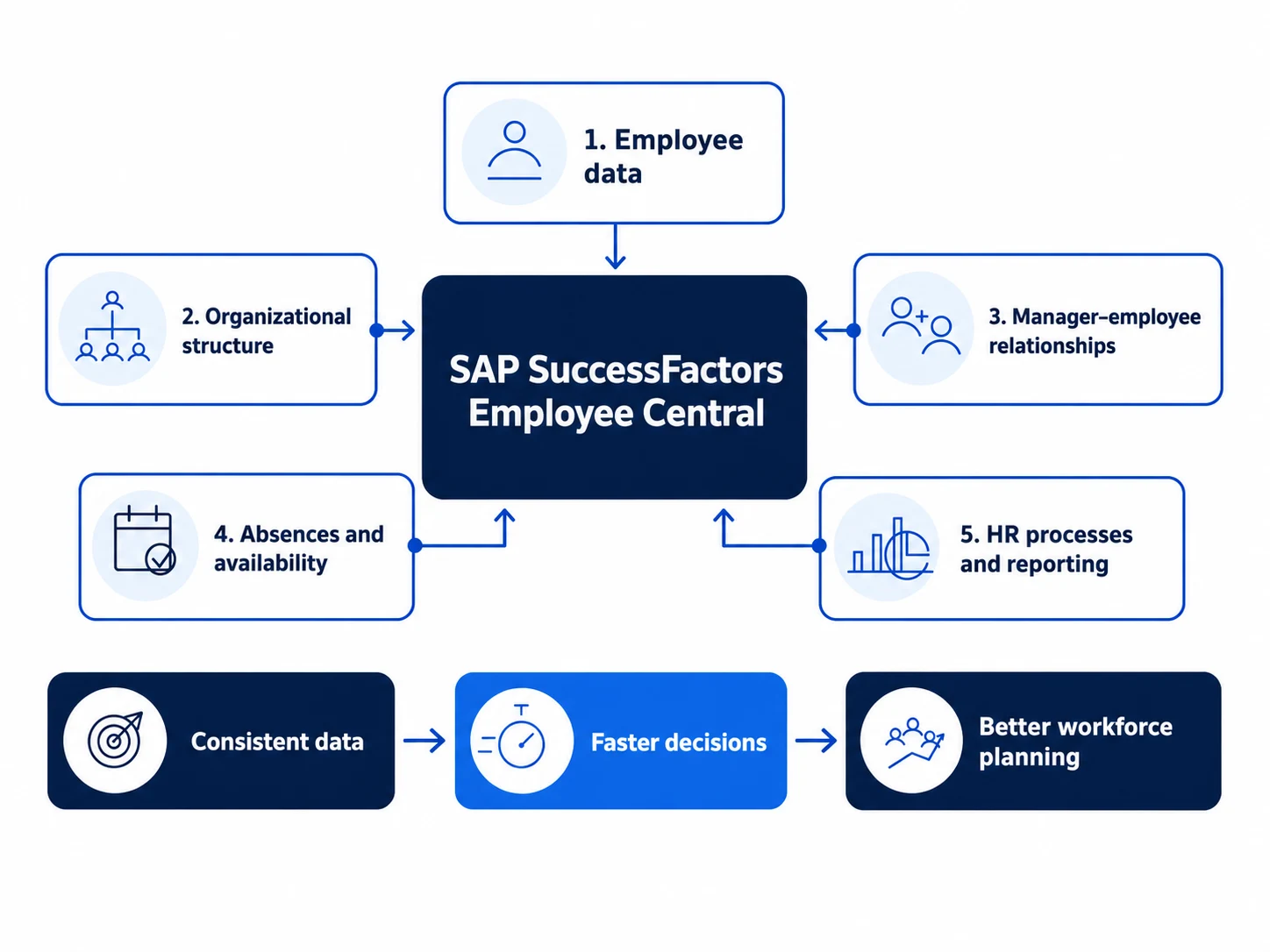
SAP SuccessFactors Employee Central organizes the foundation of this process: employee data, organizational structure, manager-employee relationships, and information needed to support HR processes.
Without such a foundation, it's difficult to talk about reliable team work planning, because every decision starts with checking if the data is up-to-date.
In a large organization, managers should have quick access to up-to-date information about who can realistically take over a task.
When a plan needs to change quickly
Such situations often arise at the least expected and worst times.
- An employee reports an absence in the afternoon.
- A client accelerates a deadline.
- A project needs additional support.
- In operations, tasks need to be shifted to avoid halting work in the morning.
- In HR, an urgent matter arises that requires the presence of a specific person.
The manager needs to quickly rearrange the plan. Decide who should take over the task, what can be moved, and what should remain unchanged.
If data is scattered, the decision itself often takes less time than gathering the information needed to make it.
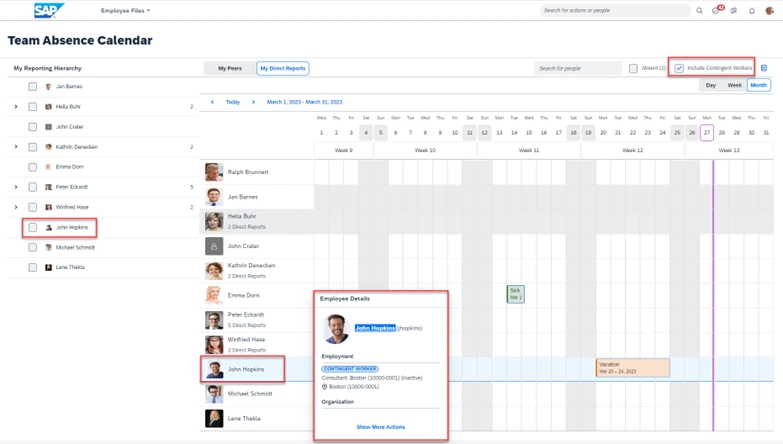
In SAP SuccessFactors, this area can be organized more systematically. Time Off and Team Absence Calendar provide managers with visibility into team absences and employees with a simpler way to report them.
The system doesn't make decisions for people, but it shortens the path from information to action.
With many teams, such visibility is crucial. The manager doesn't start by searching for basic data. They can more quickly focus on how to adjust the plan and secure the most important tasks.
The hidden cost of manually determining information
In many companies, situations like this are handled manually for years through quick coordination, people’s experience, and the team’s goodwill. This way of working can appear flexible for a long time. Over time, however, it begins to create a cost that isn't immediately apparent.
Managers spend time determining information that should be readily available. HR answers questions that could be handled through self-service. Decisions are made later because data first needs to be confirmed in several places.
This is the same mechanism I describe in more detail in the text Less administration, more strategy. How to intelligently automate repetitive HR processes?, meaning the more manual information transfer there is, the less time remains for work that provides real value to the business.
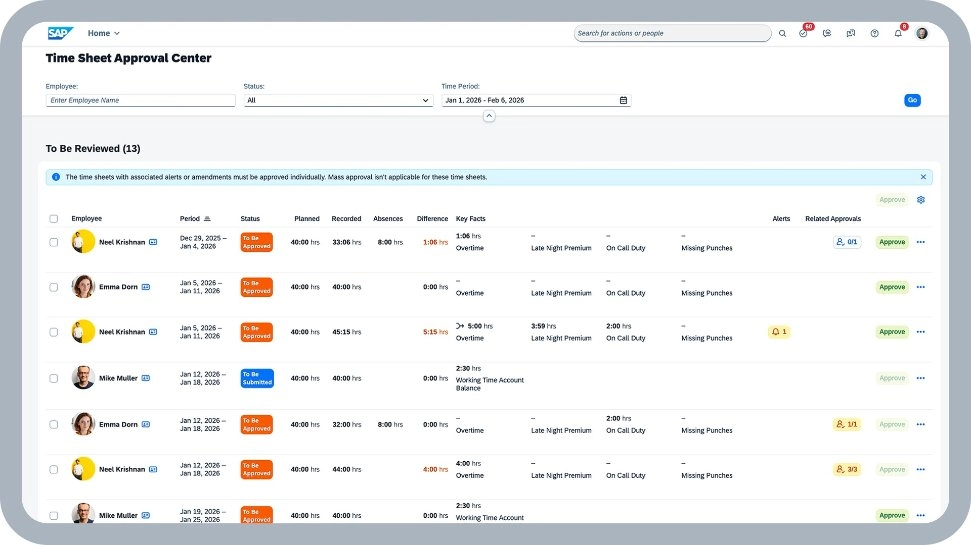
SAP SuccessFactors Time Tracking is crucial in this context. When rescheduling work, mere information about an absence is not enough. The context of working hours, schedules, approvals, and organizational policies is also needed.
If time data is organized, the decision to reschedule work is less based on intuition and more on current data.
For the CEO, the conversation can begin with a simple question: how much time does the organization waste trying to figure out what it should see immediately?
For the CHRO, this is a question about the role of HR. Should HR still be the place where every minor doubt lands, or should it rather provide managers with processes, data, and tools for independent action?
What to organize before discussing technology
Implementing SAP SuccessFactors makes the most sense when an organization knows what problem it wants to solve. Therefore, before discussing modules, it's worth asking a few practical questions.
- Does the manager see their team's current absences without asking HR?
- Is working time data current and consistent with what the manager sees?
- Does HR have a single view of data, or does it have to combine information from several systems?
- Does management see absence trends and team workloads, or only individual cases?
The answers show where the process is mature and where it still relies on manual information gathering.
If the organization still relies on emails and forms for this area, a good next step is to organize it into a self-service model. I elaborate on this in the article How to transition form chaos to simple HR self-service?
In practice, the goal is for employee data, organizational structure, absences, working hours, and reporting not to exist in silos.
Employee Central provides a common HR database. Time Off and Team Absence Calendar help the manager see team absences. Time Tracking adds working time context. People Analytics allows checking whether individual situations form a recurring pattern.
From absence management to workforce continuity management
Absences in many companies are treated primarily administratively. An employee submits a request, the manager approves, and HR sees the information in the system. In a larger organization, merely recording an absence is not enough.
Absences affect team availability, deadlines, customer service, projects, shift work, and the workload of those who remain. If an organization views absences solely as individual requests, it easily loses the bigger picture.
If every absence triggers a chain of questions, confirmations, and waiting for a decision, we return to the problem I described in more detail in the text Half the company is waiting for a decision. Who is responsible for this?
SAP SuccessFactors People Analytics helps elevate the conversation to the level of management data. It allows you to see where absences occur more frequently, which teams are consistently working at the limit of their availability, where the risk of overload is increasing, and where operational decisions require better support.
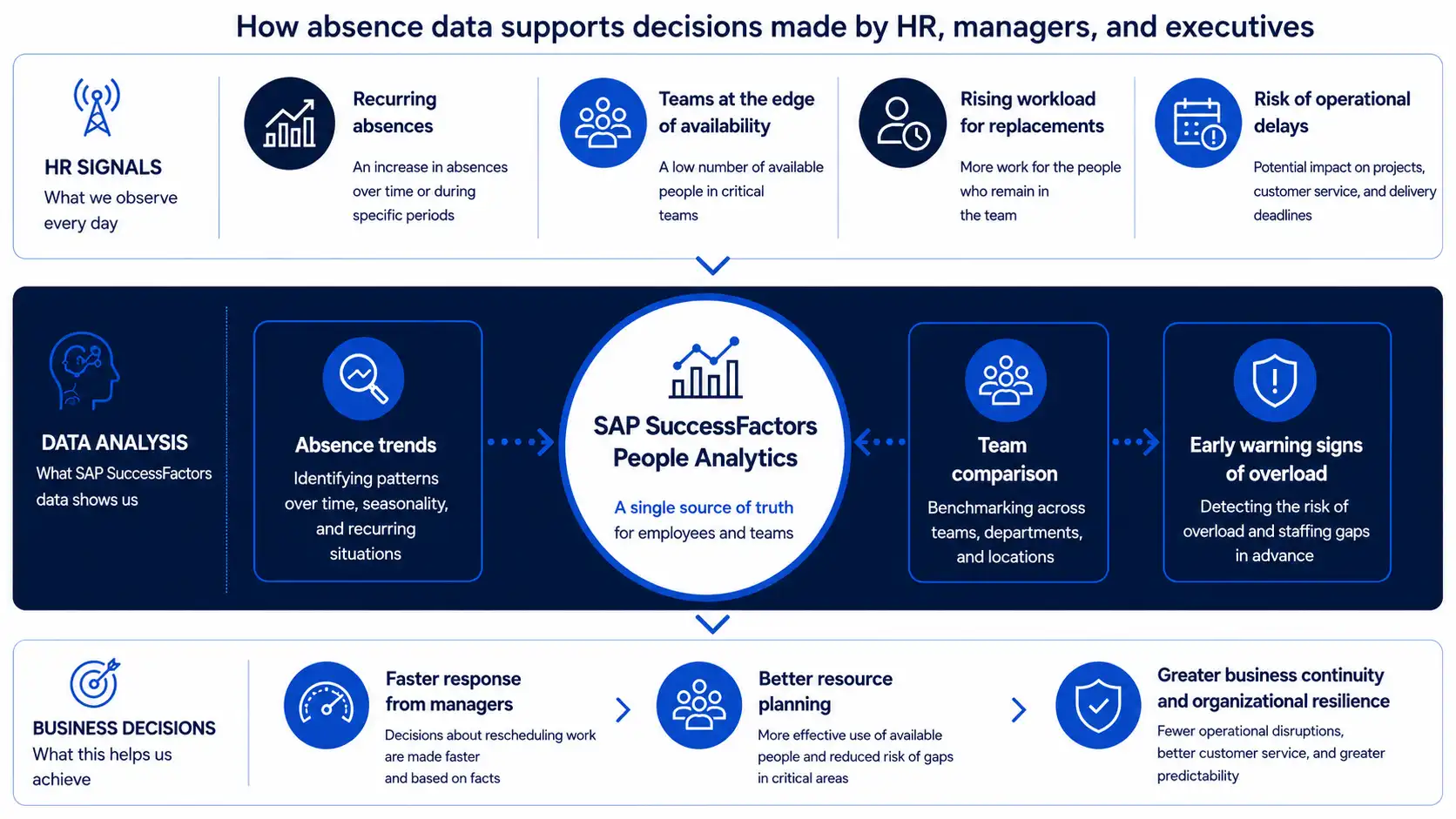
The same logic applies to other HR signals. I also wrote about how analytics helps identify problems earlier in the article How to identify turnover risk early with HR analytics?
For CHROs, this is an opportunity to speak to the business in terms of facts, not isolated reports.
For CEOs, it's a way to see if daily disruptions are isolated incidents or already a pattern affecting the organization's operational fluidity.
A simple test for organizations
Sometimes it's worth checking this area with one question for managers: How long does it take you to reliably answer who is available tomorrow and can take on an additional task?
If the answer is: a few minutes, because the manager sees absences, working hours, and the basic team context in one place, the organization has a good starting point.
If you need to check a calendar, write to HR, open a spreadsheet, ask a team leader, and confirm status via messages, it's a sign that data and processes aren't supporting decisions as well as they should.
The second question should be for HR and management: do we know where such situations occur most frequently and how much manual work replanning costs us?
It's not always possible to calculate this immediately. However, you can start by observing: how many people are involved in determining availability, how long a decision takes, how many times HR has to clarify status, and how many times a manager makes a decision without a complete picture.
Even such a simple observation can show that the issue concerns the organization's operating model, not just absences themselves.
What this means for HR and management
The question "who is available tomorrow?" clearly shows whether HR data is operationally useful.
If the answer requires multiple actions, managers become integrators of information from various sources. On a larger scale, it's difficult to consider this an efficient working model.
SAP SuccessFactors can help when an organization wants to streamline both request handling and the entire decision context: employee data, structure, absences, working hours, team visibility, and analytics. This allows managers, HR, and the business to work with the same, up-to-date picture.
Do you want to check where data gaps, process inefficiencies, and HR decision-making issues most frequently arise in your organization? Fill out HCM AI Readiness Scorecard and see which areas are worth starting with to streamline HR.

Ludwik Bogdański is a certified expert with more than 15 years of experience in running and implementing SAP systems integration projects, covering both client implementations and cloud projects, including SAP SuccessFactors and SAP Business Technology Platform (BTP). He specializes in the migration and transformation of SAP systems, providing the highest quality and knowledge necessary for the most complex and demanding projects. During his career, he conducted numerous trainings at SAP Training Centers in Poland and Europe, sharing practical knowledge and best practices. He currently works with the Ensis Technology team, supporting companies in the digital transformation of the HR area. Its key specializations are: • Implementation of SAP S/4HANA and SAP SuccessFactors • Project management according to SAP Activate and PRINCE2 methodologies • Integrations of SAP systems
Latest Articles
A good benefits process begins when employees don't have to ask HR what they are entitled to. They can see their own offer, know the deadlines, and understand what happens after they make a selection.
Recurring payroll adjustments are a sign that an organization is catching exceptions in data, decisions, or information flow too late. This article explores how to increase process predictability and reduce manual reconciliations before month-end closing.
A competency map helps verify if an organization has the people needed to execute its strategy, new projects, and business changes. Organized competency data supports CHRO and board decisions regarding development, succession, reskilling, and recruitment.