

Chaos in HR self-service can stem from unclear processes and scattered forms. Effective HR self-service should guide the user to the correct task, instead of forcing them to search for a process hidden behind administrative language. SAP SuccessFactors with AI features supports simpler service paths, better data quality, and fewer inquiries to the HR department. From a CHRO's perspective, well-designed HR self-service improves employee experience, increases operational efficiency, and reduces the number of issues returning to the team.
An employee tries to do something seemingly simple: find the right place in the system to handle an HR matter. Leave requests, training, forms, tabs, tiles, approvals, case status - it's all somewhere, you just need to know where. For the HR department, such a setup might be familiar for years, but for an employee, it resembles a labyrinth they need to escape.
This accurately describes many organizations that already have digital HR tools, yet the daily employee experience remains far from simple. The system exists, processes are documented, forms are available, and yet employees still write to HR with questions: where to find it, how to submit it, who approves it, why the status isn't changing, and if they've chosen the correct form.
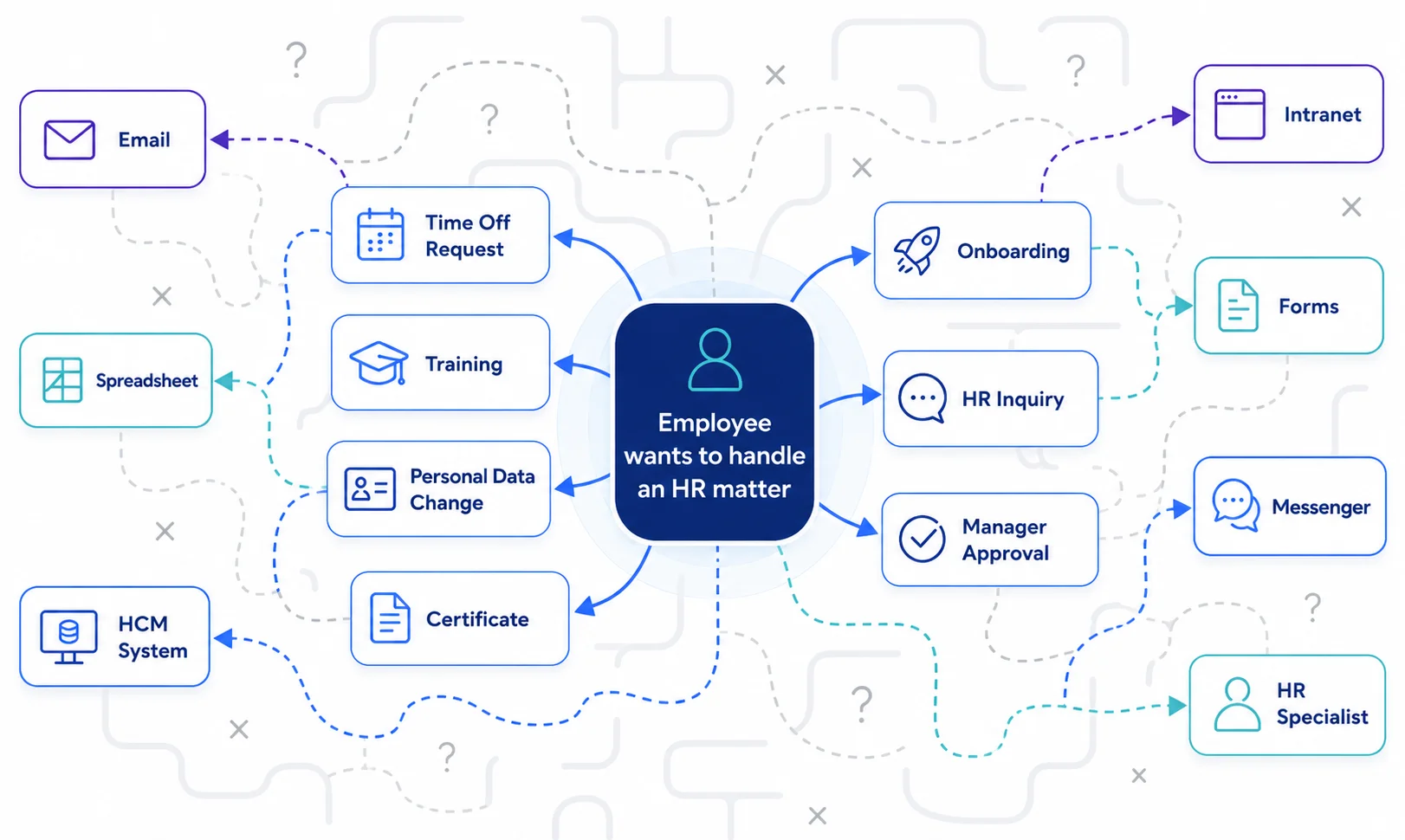
For a CHRO, this topic is much broader than user convenience. Behind the chaos in HR self-service lie concrete costs: a higher number of inquiries to the HR department, lower system adoption, poorer data quality, longer case resolution times, and growing frustration among employees and managers. In practice, self-service, which was meant to relieve HR, starts acting as an additional layer of organizational noise.
It's also worth looking at this in the broader context of HR process automation, which we discuss further in the article: Less administration, more strategy. How to intelligently automate repetitive HR processes?
HR self-service starts with the employee experience
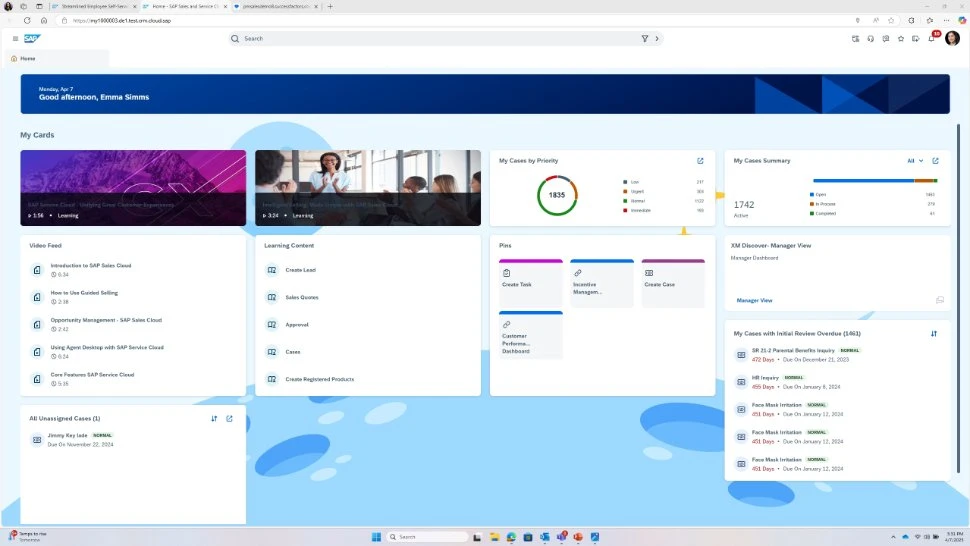
In many companies, HR self-service was implemented for a very rational reason: to reduce manual handling of repetitive tasks, accelerate processes, and give employees greater control over simple actions. In theory, an employee can submit a leave request, update data, check training, download a document, report a change, or initiate a selected process on their own.
The problem begins when an employee sees a collection of independent locations, names, and forms. From an HR perspective, each element might have a justification, stemming from implementation history, organizational structure, legal requirements, team habits, or limitations of previous systems. However, from an employee's perspective, something much simpler matters: they want to handle the task quickly and correctly, without guessing where to click, whom to ask, and whether the chosen path will indeed initiate the right process.
That's why well-designed HR self-service should start with very practical questions:
- what tasks employees handle most frequently,
- where they get lost today,
- which forms are confused,
- what questions return to HR,
- where managers block processes due to a lack of clear information, and which data is later manually corrected because the user chose the wrong path.
One entry point to HR: Less searching
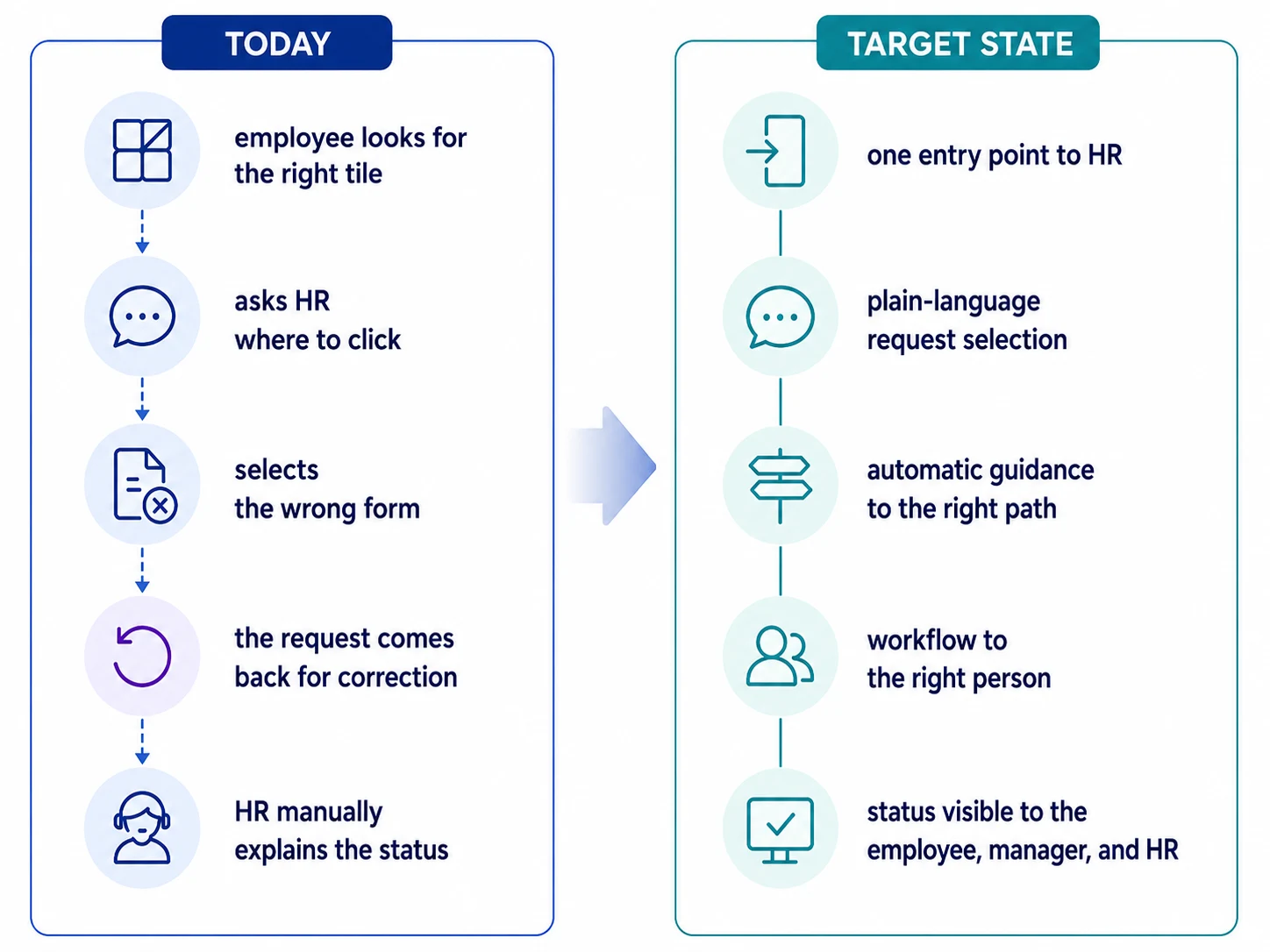
An employee who wants to take leave should be able to access the leave process, see their current allowance, submit a request, and understand what happens next. Someone looking for training should be able to move from a development need to a specific path or course. A manager approving a request should see the context of the decision, and HR should have insight into statuses, exceptions, and data, instead of manually tracking issues scattered across emails, spreadsheets, and communication tools.
Here, HR self-service is closely tied to the issue of accountability. Even the best-prepared form loses its meaning when a matter gets stuck awaiting approval because the owner is unclear.
We discuss this problem in more detail in the article: Half the company is waiting for a decision. Who is responsible for this?, because in many organizations, HR delays stem precisely from unclear accountability, not merely from a lack of tools.
Where chaos most often begins
The most visible chaos usually arises in simple, repetitive matters. These are precisely what generate the largest volume of questions, as they concern a large number of employees and managers. Leave requests, timesheet corrections, absence notifications, personal data updates, training registrations, document approvals, new employee onboarding, or inquiries about case status. Individually, these are small tasks, but on an organizational scale, they can consume a significant portion of HR's operational work.
This is particularly evident in onboarding. A new person needs access to information, tasks, documents, training, and the people responsible for the next steps. If these elements are scattered, the first weeks of work begin with improvisation, and HR and managers compensate for systemic shortcomings with manual coordination.
We write more about how to view onboarding through the lens of costs and delays in the article: Onboarding 0–180: How to regain control over post-hire costs and delays.
A second common source of chaos is exceptions. In many companies, processes started simply but over time became overgrown with additional variants: for different locations, employee groups, contract types, companies, supervisors, approval levels, and formal requirements. Without organized process rules, even the best starting screen quickly turns into a list of exceptions that must be known from experience.
The third source of the problem is language. The names of forms, tiles, and tabs often reflect administrative logic rather than an employee's way of thinking. If a user has to wonder whether their matter falls under "basic data," "personnel administration," "employee requests," or "HR services," they lose confidence from the outset that they are on the right path.
SAP SuccessFactors as an example of streamlining HR paths

This is where the role of HCM systems, such as SAP SuccessFactors, naturally emerges. Their value is not limited to digitally replicating forms, but rather to the ability to connect data, processes, roles, approvals, and reporting in one cohesive environment.
Employee Central can serve as the foundation for employee data and organizational structure, ensuring that processes are based on up-to-date information about the employee, position, supervisor, unit, or location. Workflow organizes approvals and the transfer of matters between responsible parties. Time Off allows for managing leave processes with visible allowances and status. Learning can support access to training and development paths. Employee and manager self-service gives users the ability to handle matters where the data and processes reside.
In practice, such a model works best when the organization has a single reliable source of data regarding employees, structure, and responsibilities. It is this data that determines whether the system knows who should approve a request, what permissions a user has, to which group an employee belongs to, and which process variant should be initiated.
We write more about this logic in the article: Zero data risk: How does “one source of truth” protect against management paralysis?
HR self-service also means access to development, not just requests and forms
HR self-service is often associated with leave, personal data, and administration, but in modern HCM, it also encompasses employee development. Access to training, development paths, and recommended educational activities should be as simple as submitting a request. An employee should know where to find training, how to enroll, which courses are mandatory, and which support their further development.
This is especially important where an organization wants to develop competencies internally, rather than always resorting to external recruitment. Then, an LMS ceases to be merely a course catalog and becomes one of the tools for competence management.
We elaborate on this topic in the article: When does LMS-based reskilling outperform hiring, and how do you know?
AI reinforces the order that already exists within an organization
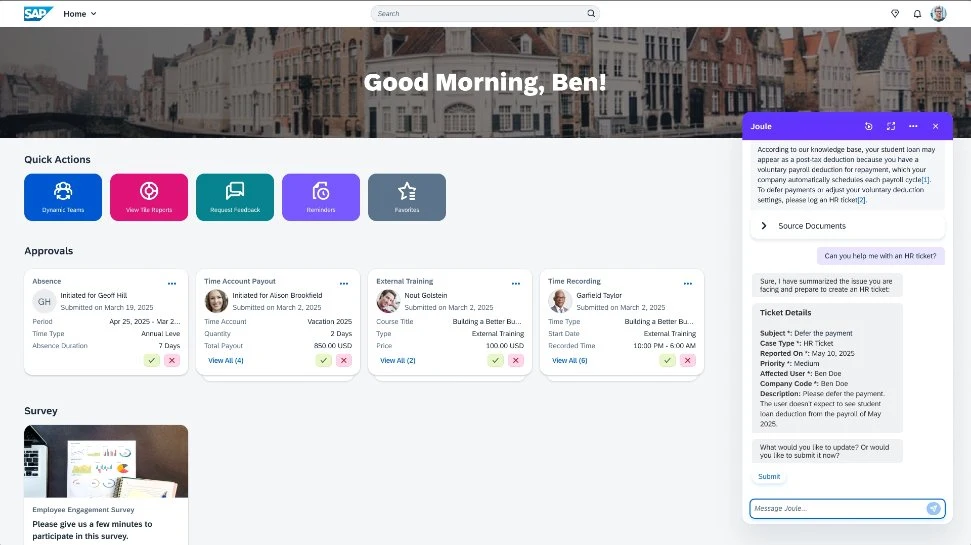
AI functionalities, including solutions like Joule within the SAP ecosystem, can significantly change how HR systems are used. Instead of searching for the right tab, a user can ask about a specific matter in simple language. Instead of navigating through several locations, they can quickly find the correct information or action. Instead of reading a lengthy manual, they can receive a context-specific hint.
This is an attractive direction, especially for organizations looking to increase HR tool adoption and reduce the number of simple inquiries directed to HR teams. AI, however, reinforces the quality of the order that already exists within an organization. When data is scattered, processes differ between units without clear justification, responsibilities are unclear, and names and rules require an internal translator, the assistant has limited scope for real help.
Therefore, the conversation about AI in HR should begin with very basic topics: data quality, process owners, standards, integrations, glossaries, permissions, and workflow rules. Only on such a foundation can AI guide an employee to the right matter, suggest next steps, and reduce the feeling of being lost in the system.
What a CHRO should check before overhauling HR self-service
Before a major change, it's worth looking at HR self-service through the eyes of an employee, a manager, and the HR team:
- An employee should be able to quickly find common issues and understand what happens after reporting them.
- A manager should receive decisions with the appropriate context.
- HR should see the end-to-end process, have control over exceptions, and use data that requires minimal subsequent tidying.
A good exercise is to go through several typical scenarios from start to finish: submitting a leave request, signing up for training, changing personal data, onboarding a new person, requesting a document, manager approval, and checking status. In each of these scenarios, it's worth noting how many steps the user takes, how many times they switch tools, where uncertainty arises, what information needs to be known beforehand, and when the matter returns to HR.
Such an analysis quickly shows whether an organization has true self-service or rather a digital catalog of tasks that primarily works for those who understand its internal logic.
From a broader perspective, HR self-service data can also reveal a lot about the organization's health. Recurring questions, delays, decreased activity, problems with access to information, or low participation in development activities can be signals worth analyzing alongside other HR data.
We write more about this approach in the article: How to identify turnover risk early with HR analytics?
Relieving the burden on HR starts with simplicity
The best HR self-service is almost invisible to the employee. The user handles the matter and moves on. The manager understands what needs to be approved. HR sees data, statuses, and exceptions. The organization benefits from less manual work, fewer support questions, and better information quality.
This is where the comic-book-like "HR Enigma" becomes a good starting point for a serious conversation about digitalization, because often the problem lies in how the tool itself is structured in relation to employees' actual needs.
A well-designed SAP SuccessFactors, supported by streamlined processes, clear workflows, employee and manager self-service, and AI functionalities, can help transition from a "find the right form" logic to a "get things done" logic. For employees, it's the difference between searching and acting. For HR, it's the difference between constantly answering the same questions and truly managing the process.
And for CHROs, this is one of those areas where employee experience, operational efficiency, and AI readiness converge in a very practical way: in the everyday tasks that should simply work.
Where to start
The best first step is a brief diagnosis. It's worth checking which HR processes are most fragmented today, where employees most often get lost, which data requires correction, and whether the organization already has a foundation for automation and AI.
HCM AI Readiness Scorecard helps to look at this area from the perspective of processes, data, self-service, and the organization's readiness for further automation. It's a good starting point, especially when the question arises within the company: "How does this actually look for us?"

Ludwik Bogdański is a certified expert with more than 15 years of experience in running and implementing SAP systems integration projects, covering both client implementations and cloud projects, including SAP SuccessFactors and SAP Business Technology Platform (BTP). He specializes in the migration and transformation of SAP systems, providing the highest quality and knowledge necessary for the most complex and demanding projects. During his career, he conducted numerous trainings at SAP Training Centers in Poland and Europe, sharing practical knowledge and best practices. He currently works with the Ensis Technology team, supporting companies in the digital transformation of the HR area. Its key specializations are: • Implementation of SAP S/4HANA and SAP SuccessFactors • Project management according to SAP Activate and PRINCE2 methodologies • Integrations of SAP systems
Latest Articles
A good benefits process begins when employees don't have to ask HR what they are entitled to. They can see their own offer, know the deadlines, and understand what happens after they make a selection.
Recurring payroll adjustments are a sign that an organization is catching exceptions in data, decisions, or information flow too late. This article explores how to increase process predictability and reduce manual reconciliations before month-end closing.
Why is the question "who is available tomorrow?" largely a test of an organization's HR data quality, absence visibility, and decision-making agility? This article shows how SAP SuccessFactors helps organize employee data, absences, working time, and analytics so managers can react more quickly to changes in work schedules.